
Go Live Checklist
To active production environment should meet the two conditions: 1. KYC certified; contract signed.
1.Test and Acceptance
After completing the technical integration, you are recommended to test the function according to the following cases.
1.1 Get Order Status
a.Configure Callback URL
Please confirm whether the callback URL is configured correctly. Currently, two configuration methods are supported: interface and the Merchant Management Platform. Configure Methods
- Correctly configuring the callback URL can help you obtain order status timely.
b.Update Order Status
Please correctly understand and process the order status given by PayerMax.
- You can update order status through asynchronous notification or result query.
- Incorrect understanding of order status may result in loss of funds.
- Order status descriptions is as follows: -- status=0 Pending(not final status)
This is not the final status, please wait for the callback notification from PayerMax.
-- status=1 Success
Customer has paid successfully. Please provide service to the customer.
-- status=2 Failure
Customer fails to pay. Please handle the order as payment failure.
1.2 Information Security
a.Order Information Storage
Please confirm whether the order information is stored on the server end to avoid loss of data.
- It is recommended to store customers' payments data on the server end to ensure that it will not be lost in the following scenarios. -- Overwrite installation -- Customers quit or closes the APP -- Clear the APP cache
b.Customer Information Security
Please ensure that the customer ID (custId) passed in is unique to avoid revealing the customer's personal information.
- We will recommend the successful payment method based on the custId.
- If the merchant side cannot guarantee the uniqueness of custID, it will cause users to see other customers’ payment information.
2.Merchant ID, Secret Key, Callback URL of Production Environment
2.1 Merchant ID
The merchant ID of production environment is the same as it of testing environments. Please log in Merchant Platform and enter [Config] - [Settings] page to get the Merchant ID.
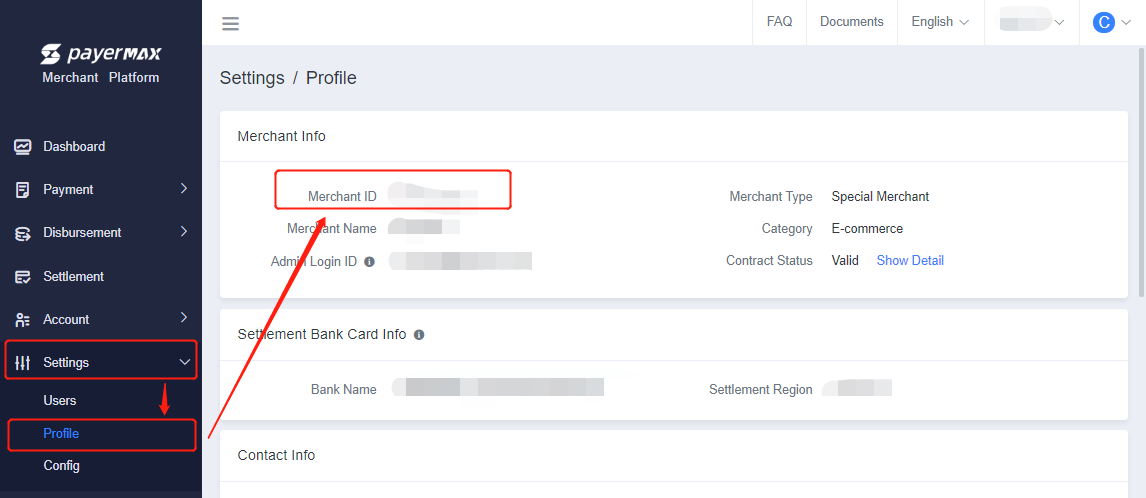
2.2 Get the Secret Key of Production Environment
The Secret key of the production environment needs to be regenerated. Please log in Merchant Platform and enter [Config] - [Settings] page to generate the secret key. 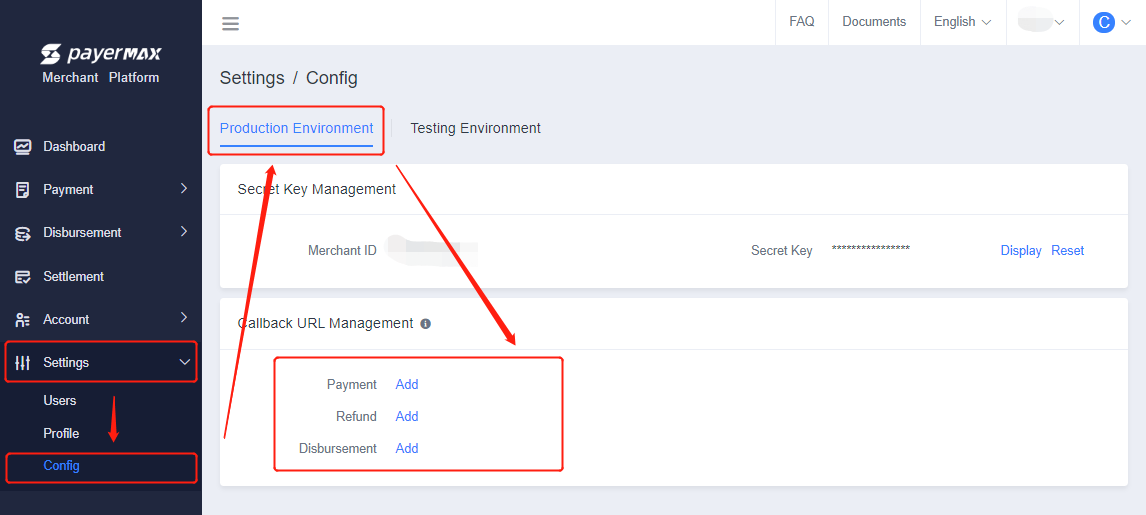
2.3 Confugure the Callback URL of Production Environment
The callback URL of the production environment needs to be reset. There are two ways to configure callback URL:
- Enter “Config” – “Settings” page of Merchant Platform to config callback URL.
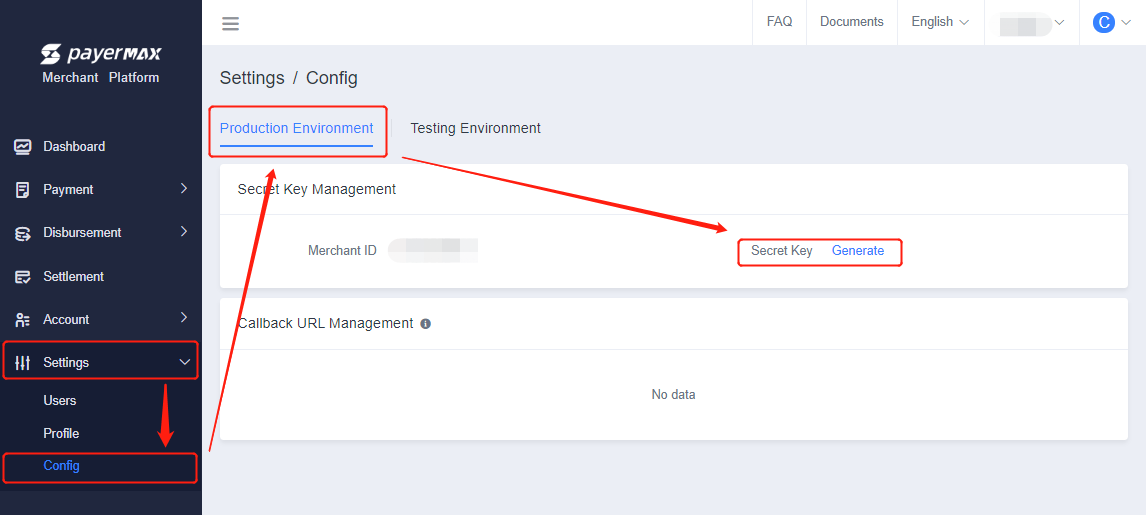
- Configure the callback URL in requested parameters when placing an order. Notice: If the callback URL configured through the interface is conflicts with the URL configured on the Merchant Platform, callback URL configured through the interface shall prevail.
3.Request Environment Replacement
The service address of the production environment is different from the testing environment. Please pay attention to switch.
3.1 Environment Request Address
| Service | Service Address |
|---|---|
| Payment Service | https://pay-gate.payermax.com/aggregate-pay-gate/api/gateway |
| Disbursement Service | https://pay-gate.payermax.com/aggregate-pay-gate/api/gateway/v2 |
3.2 Precautions for production environment (Payment Service)
- For details on the precautions for the API production environment, please refer to:Precautions for production environment(API).pdf