PayerMax Merchant Platform Operation Guide
1. Onboarding, Signing and Agreement Confirmation
- PayerMax's business team will complete customer onboarding in the background and enter the super administrator's information (please contact PayerMax's business team if you need to modify the administrator).
- After receiving the email, the super administrator can enter the platform according to the email guidelines and confirm the agreement.
- Agreement confirmation is available in two ways: online and offline:
- Offline: After PayerMax's business team completes the agreement with you offline, it will be uploaded to the background; no further operation is required on your part on the platform, and you can use the platform directly after activation.
- Online: You need to log in to the merchant platform and complete the agreement confirmation before using the platform normally.
2. Service Provider Center
2.1 Sub-merchant Basic Information
ISV clients can log in to the merchant platform and query sub-merchant information via → .
- Displays all authorized sub-merchant information, including both valid and expired authorization statuses (an expired status indicates transaction suspension).
- For valid sub-merchants, ISV clients can view available payment methods;
- For expired sub-merchants, the platform will no longer support inquiries of available payment methods.
2.2 Sub-merchant Payment Method Availability
Two inquiry paths are supported:
Path 1: Go to → , locate the target sub-merchant, and click to enter the dedicated page.
Path 2: Directly query sub-merchant availability via → .
- Only supports inquiries for sub-merchant payment method availability, excluding the ISV’s own account (transaction verification is based solely on sub-merchant configurations);
- Only single sub-merchant inquiry is supported at a time; fuzzy search is available (input sub-merchant information instead of ISV account information).
Note:
If a sub-merchant’s authorization expires, relevant data will no longer be displayed.
3. Sub-merchant Order Inquiry
After sub-merchant acquiring transactions are initiated, ISV clients can query transaction records via → in the merchant platform.
4. ISV User Management
- This module is only critical for clients accessing the merchant platform; pure API integration clients may disregard this section.
- By default, only super administrators have permission to add or edit users; query permissions can be assigned to other users as required.
4.1 Role Management
4.1.1 Create Custom Roles
Access the role list via → → , then click Create Role to add a custom role.
| Step 1 | |
| Step 2 | |
| Step 3 | 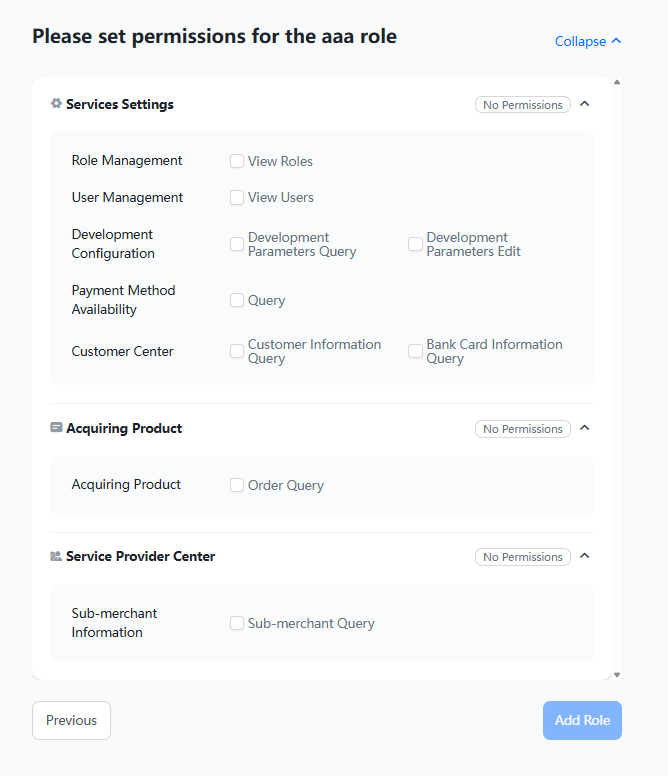 |
Select required permissions and click Add Role to complete custom role creation.
4.1.2 Edit Roles
Important:
Only custom roles support editing; default system roles cannot be modified manually.
| Step 1 | |
| Step 2 |
Default roles are non-editable. Changes to custom roles take effect immediately for all users assigned to the role.
4.2 User Management
4.2.1 Add New Users
Access the user list via → to view all account users. Click Add User to initiate the creation process (only super administrators have user creation permission).
| Step 1 | |
| Step 2 |
Complete user creation following page instructions. New users will receive an activation email to complete account activation and log in to the MMC platform.
4.2.2 User Information Modification
Super administrator information can only be updated by PayerMax business personnel via the backend. All other user accounts can be managed by the super administrator within the merchant platform, including profile details, role assignments, and authorization relations.
4.3 User Permission Control
- Super administrators are granted full functional and data permissions by default with no additional configuration required.
- For all non-super administrator users:
- Role Permissions: Control accessible menu features in the merchant platform (refer to the Permission Logic chapter for detailed rules);
- ISV MID Authorization: Determines data access scope based on authorized merchant IDs, on top of functional permissions.
- Note: Users with ISV MID authorization gain access to all sub-merchants under the authorized ISV account; separate sub-merchant permission assignment is not required.
5. ISV Customer Center
View basic ISV account information in this module.
| Function | Page Display |
| ISV Customer Basic Information | |
| ISV Customer Bank Account Details | |
| Authorized Users (Only users with MID authorization can view sub-merchant transactions and data under the ISV account) |
6. ISV Development Parameters
6.1 Key Usage
| Step 1: View Key Details | Click the target key to view detailed information in the pop-up window |
| Step 2: Configure Public & Private Keys | Complete internal system configuration independently |
During actual transaction processing, the system verifies both the ISV’s keys and the corresponding sub-merchant keys (sub-merchants can manage their own development parameters via the merchant platform).
6.2 Edit Keys
Caution:
Proceed with extreme caution!
Merchant public keys can be edited within the platform if business adjustments are required. Updates take effect instantly for live transactions.
7. Profile Settings
The platform supports multi-language and time zone customization. Configure personal preferences in the personal information module.
| Step 1 | |
| Step 2 |
8. Customer Support Tickets
For inquiries regarding orders or platform operations, submit support tickets via the customer service icon in the upper right corner, accessible on all platform pages.
9. Permission Logic
9.1 Functional Permissions (Role-Based Control)
| Module | Controllable Permission Points | |
| Homepage | / | Granted to all users by default |
| Sub-merchant Information | Basic Information | |
| Payment Method Availability | ||
| Sub-merchant Orders | Acquiring Product | |
| User Management | View | |
| Edit | Super administrator exclusive | |
| Development Parameters | View | |
| Edit | ||
| Client Center | Customer Information Query | |
| Bank Card Information Query | ||
| Agreement Management | Inquiry & Signing | Super administrator exclusive |
9.2 ISV MID Data Permissions
Authorize ISV merchant data access via → . Users must obtain both menu functional permissions and ISV MID data permissions to access complete platform data (menu access without data authorization will result in empty content).
Remarks:
No user or sub-merchant permission setup is required.