
Technical Problem
1. Global Acquiring
1.1 How to redirect to and open third-party wallets for payment within WebView
Answer:
Refer to the document: Open Wallet Via WebView
1.2 When opening DANA payment, the page shows blank or "The network connection is unstable. Please try again later."
Question:
API standard deposit access method, open the DANA payment method, the page prompts an error, the phenomenon seen is blank, the actual page is relatively large, and the page error can be seen on the mobile page: "The network connection is unstable. Please try again later."
Answer:
If the container to open PaySDK is Android WebView, you need to set the WebSettings property of webView, the code is as follows
webSettings.setDomStorageEnabled(true);
webSettings.setTextZoom(100);
webSettings.setUseWideViewPort(true);1.3 How to return to your APP after successful payment
Answer:
Open the cash register url in your own APP, and open the jump address (front-end callback address frontCallBackUrl) after the payment is completed, which is also inside the app. If you use an external browser to open the URL of the cash register, when the payment is completed and open the jump address (front-end callback address frontCallBackUrl), it is opened in the external browser. If you want to jump to the inside of the app, you need to jump through (schema DeepLink) change.
1.4 Asynchronous callback notification considerations
Answer:
The callback address must actually exist; Protocol format: application/json; Protocol return content: Please check【Callback Notification】 The problem of unreachable addresses (if the merchant server has restrictions on access to external IP addresses, the payermax server IP address needs to be added to the whitelist of the merchant server.
1.5 After clicking the "Confirm Payment" button, the follow-up payment page is not opened
Question:
API standard deposit access method, after clicking the "Confirm Payment" button, the follow-up payment page is not opened
Answer:
If the container that opens the API is Android's WebView, you need to do the following processing on the WebView, the following is the sample code:
mWebView.setWebViewClient(new WebViewClient());1.6 Entering the cashier, the page prompts "The format of the request parameter is wrong"
Question:
The merchant uses String.format(Locale.default(), "%.2f", price) to format the amount, causing the amount format to be garbled
Answer:
Since Locale.getDefault() obtains the locale of the region where the current device is located, the formatted strings are different in different regions. It is recommended to use String. format(Locale. ENGLISH, "%.2f", price)
1.7 When using UPI to pay, the interface appears and there is no way to exit
Quesition:
Use UPI payment to enter the channel page, operate and then click the back button, there is no way to return to the previous page or after exiting, the cashier cannot be opened after entering again.
Answer:
If the merchant leaves the webView, use "webView.loadDataWithBaseURL(null, "", "text/html", "utf-8", null);" to close the current JS thread. Need to be modified to "webView.loadUrl("about:blank");"
1.8 Adaptation issues such as incomplete display of payment methods or confusing styles on the cashier page
Question:
If the payment method on the cashier page is incompletely displayed or the style is confusing, for example:Sample.png
Answer:
Merchants need to set the following parameters of webView:
mWebView.getSettings().setTextZoom(100);1.9 The soft keyboard covers the input box when paying
Question:
When paying, some input methods need to enter the mobile phone number or email address. At this time, click the input box, and the soft keyboard will cover the input box.
Answer:
If the above problem occurs, you need to check the container as follows:
- Do not set full screen mode
- windowSoftInputMode can not be set or set to adjustResize, do not set to adjustPan
- If it is an immersive status bar, you need to set fitSystemWindows=true in the layout
1.10 The URI sent by the merchant to PayerMax is capitalized at the beginning of APP://, why did we change it to start with app:// when redirecting?
Because the browser and webview automatically convert, the scheme is not case-sensitive in the browser, and will be uniformly converted to lowercase. When configuring in the manifest, the scheme and host must be all lowercase
1.11 What is the reason why the page reports this kind of error 'X-Frame-Options'
Generally, the channel side page does not support iframe nesting, please check whether X-Frame-Options is set in the web service.
1.12 If the container that opens the link address of the cash register is Android WebView, please refer to the following code settings
        WebSettings webSettings = mWebView.getSettings();
        webSettings.setJavaScriptEnabled(true);

        webSettings.setSupportMultipleWindows(true);
        webSettings.setJavaScriptCanOpenWindowsAutomatically(true);

        webSettings.setPluginState(WebSettings.PluginState.ON); //enable plugin. Ex: flash. deprecated on API 18
        //whether the zoom controls display on screen.
        webSettings.setBuiltInZoomControls(true);
        webSettings.setSupportZoom(true);
        webSettings.setDisplayZoomControls(false);

        //disable the webview font size changes according the phone font size.
        webSettings.setTextZoom(100);
        webSettings.setSaveFormData(true);
        webSettings.setUseWideViewPort(true);
        webSettings.setLoadWithOverviewMode(true);
        webSettings.setAllowFileAccess(true);

        if (Build.VERSION.SDK_INT >= Build.VERSION_CODES.LOLLIPOP) {
            webSettings.setMixedContentMode(WebSettings.MIXED_CONTENT_ALWAYS_ALLOW);
            CookieManager.getInstance().setAcceptThirdPartyCookies(this, true);
        }
        if (Build.VERSION.SDK_INT >= Build.VERSION_CODES.JELLY_BEAN) {
            webSettings.setAllowUniversalAccessFromFileURLs(true);
        }

        webSettings.setAppCacheEnabled(true);
        String appCacheDir = getDir("cache", Context.MODE_PRIVATE).getPath();
        webSettings.setAppCachePath(appCacheDir);
        webSettings.setAppCacheMaxSize(1024*1024*20);
        webSettings.setDomStorageEnabled(true);
        webSettings.setDatabaseEnabled(true);
        webSettings.setCacheMode(WebSettings.LOAD_DEFAULT);

        try {
            mWebView.removeJavascriptInterface("searchBoxJavaBridge_");
            mWebView.removeJavascriptInterface("accessibility");
            mWebView.removeJavascriptInterface("accessibilityTraversal");
        } catch (Exception e) {}

        if (Build.VERSION.SDK_INT >= Build.VERSION_CODES.LOLLIPOP) {
            mWebView.enableSlowWholeDocumentDraw();
}1.13 The page reports "net::ERR_CACHE_MISS"
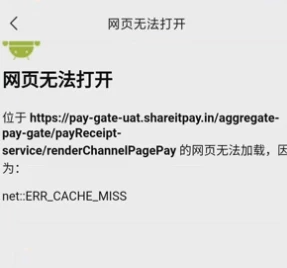
This is because the network permission configuration is abnormal. You can change the permission configuration attempt in AndroidManifest.xml. old: new: Reference:https://stackoverflow.com/questions/30637654/android-webview-gives-neterr-cache-miss-message
1.14 The system browser is normal, but using iOS wkwebview to jump will fail, and the page cannot be opened normally
The possible reason is that wkwebview changes the url encoding, resulting in an abnormal link. # in the link is urlEncoded to %23. You can add code logic to webview to avoid abnormal encoding of url
OC
-(NSString *)WM_FUNC_urlEncode:(NSString *)urlStr{
NSMutableCharacterSet *set  = [[NSCharacterSet URLQueryAllowedCharacterSet] mutableCopy];
[set addCharactersInString:@"#"];
return [urlStr stringByAddingPercentEncodingWithAllowedCharacters:set];
}swift 4.0
func WM_FUNC_urlEncode(_ urlStr:String) -> String {
if urlStr.isEmpty {
return ""
}
var charSet = CharacterSet.urlQueryAllowed
charSet.insert(charactersIn: "#")
let encodingURLStr = urlStr.addingPercentEncoding(withAllowedCharacters: charSet)
return encodingURLStr ?? ""
}
The following imitates the oc writing method: CharacterSet converts NSMutableCharacterSet to operate
func WM_FUNC_urlEncode(_ urlStr:String) -> String {
if urlStr.isEmpty {
return ""
}
let charSet = CharacterSet.urlQueryAllowed as NSCharacterSet
let mutSet = charSet.mutableCopy() as! NSMutableCharacterSet
mutSet.addCharacters(in: "#")
let encodingURLStr = urlStr.addingPercentEncoding(withAllowedCharacters: mutSet as CharacterSet)
return encodingURLStr ?? ""
}
func WM_FUNC_urlEncode(_ urlStr:String) -> String {
if urlStr.isEmpty {
return ""
}
let charSet = NSMutableCharacterSet()
charSet.formUnion(with: CharacterSet.urlQueryAllowed)
charSet.addCharacters(in: "#")
let encodingURLStr = urlStr.addingPercentEncoding(withAllowedCharacters: charSet as CharacterSet)
return encodingURLStr ?? ""
}Refernce: https://www.jianshu.com/p/e4938ada31e6
1.15 Phones above Android 9.0 cannot open the page, and the protocol is changed to https. Those below 9.0 are fine, but those above are not.
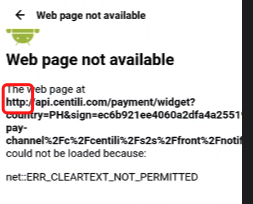
The reason may be that Android P restricts network requests for plaintext traffic of the http protocol, and non-encrypted traffic requests will be banned by the system. You can replace the relevant api/page with https protocol If you still need to use http, you can make Android webview support http protocol through the following methods:
Method One:
- Create a new xml directory under the res directory, and create a new network_security_config.xml file under the xml directory:
<?xml version="1.0" encoding="utf-8"?>
<network-security-config>
  <base-config cleartextTrafficPermitted="true" />
</network-security-config>2.AndroidManifest.xml xml copy code
<application android:networkSecurityConfig="@xml/network_security_config">
  <!--android9.0 adaptation-->
  <uses-library android:name="org.apache.http.legacy" android:required="false" />
</application>Method Two: AndroidManifest.xml added:
<application android:usesCleartextTraffic="true">Refernce https://juejin.cn/post/6844903813929762824
1.16 The webview loads the page and reports an error, net::ERR_BLOCKED_BY_RESPONSE.
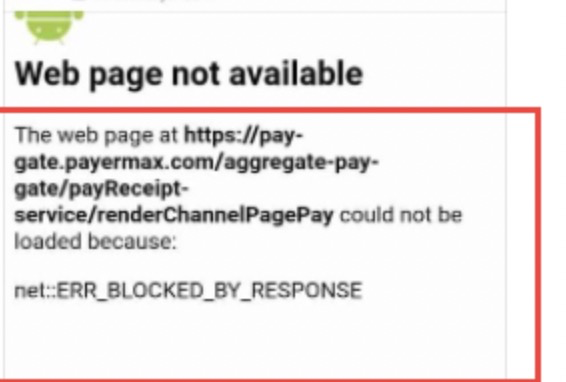 The reason for this is that this address is not supported for use in iframes. It is recommended that you open the page address directly instead of using it in an iframe.
1.17 Blank Screen Caused by WebView Layout Width/Height Not Set to MATCH_PARENT
Question:
When integrating WebView in an Android app to open the PayerMax checkout page, a blank screen appears with no content displayed.
Answer:
This issue typically occurs because the WebView's LayoutParams width and height were not correctly set to MATCH_PARENT when it was added to the parent container. If the WebView's width and height are 0 or set to WRAP_CONTENT, the WebView will not have enough rendering space. As a result, the checkout page content cannot be drawn properly, leading to a blank screen. Please ensure that you explicitly specify both the width and height as MATCH_PARENT when adding the WebView to the parent layout. Refer to the code below:
web_container_ll.addView(
    mWebView,
    new LinearLayout.LayoutParams(
        ViewGroup.LayoutParams.MATCH_PARENT,
        ViewGroup.LayoutParams.MATCH_PARENT
    )
);2. Global Payout
2.1 Mistakenly think that the payment interface response code APPLY_SUCCESS means payment is successful
Question:
The response code received from the withdrawal interface is APPLY_SUCCESS, which means the payment is successful
Answer:
The response code APPLY_SUCCESS just means that the current protocol response is successful; if you want to check whether the payment is successful, the callback result of the server shall prevail (the merchant passes in or configures the callback address of the server) or the active query shall prevail.
3. Parameter Configuration
3.1 How to generate keys?
You can log in to the merchant platform to generate and reset keys through the "Development Parameters" channel. When configuring, it is necessary to distinguish between the test environment and the formal environment.
3.2 How to add callback address?
PayerMax supports two ways to set the callback address:
- Operators or super administrators with the authority to develop parameters can generate and modify callback addresses in the "Development Parameters" channel on the merchant platform.
- Pass in the callback address when placing an order. Note: If there is a conflict between the callback address you pass in and the callback address configured on the merchant platform, the callback address you pass in shall prevail.
3.3 Why didn't I receive the callback notification?
- Please confirm whether to set the callback address.
- Please confirm whether the callback address is filled in correctly. If there is still a problem, please contact the PayerMax platform to find out the reason.